
 KP


| Starting price | $320/month billed monthly, including 2 users and 1,500 contacts |
|---|---|
| Extra users | $39/month each |
| Free plan | No. Free trial with no card, capped at 25 emails, with no payments or texting |
| Plans | One plan with the whole platform; the price scales with users and contacts |
| Best for | Consultants, coaches, clinics, agencies and home-service firms that sell to individual clients |
| Not ideal for | Sales-only teams, tight budgets, and anyone who wants self-serve setup |
| Standout feature | Automation, booking, quotes, invoices and payments tied to one contact record |
| Biggest drawback | Required implementation, priced separately, on top of a $320 starting bill |
Keap Review: Our Take
Keap's pitch is consolidation. Instead of paying for a CRM, an email automation tool, a scheduler and a payment processor, a small service business runs all of it through one subscription. If those are exactly the tools you would otherwise buy, the promise is real. The automation builder, quoting, invoicing and recurring payments are deep enough to replace several point tools at once, and every step lands on the same client record.
The trade-offs are cost and effort. Keap starts at $320 a month for two users and 1,500 contacts, which is several times the price of a general CRM. Each extra user adds $39, more contacts move you up a priced tier, and implementation is required and priced separately. The interface also asks more of you than newer, simpler tools. None of that makes Keap a bad product. It does mean the all-in-one convenience costs real money and real setup time, so it only pays off for a business that will use most of the bundle.
Bottom line: if your service business needs follow-up automation, booking and payments in one place and you will invest in proper setup, Keap earns its price. If you mainly need marketing automation on a smaller budget, start with ActiveCampaign; if you mainly need a pipeline, start with HubSpot.
What Is Keap?
Keap is sales and marketing automation software for small service businesses. It began as Infusionsoft, one of the earliest small-business automation tools, later took the Keap name, and is now owned by Thryv. Keap says its automation library draws on more than 20 years of work with small businesses.
The core idea is one connected client journey. A lead fills in a form or landing page and lands in the CRM with a tag and a lead source. Automation follows up by email and text. A booking link lets the lead pick a time on your synced Gmail or Outlook calendar. When they are ready to buy, Keap sends a quote, turns it into an invoice with a couple of clicks, and collects a one-time or recurring payment. Every step is logged on the same contact. For a consultant or a small clinic that would otherwise juggle four or five tools, that is the appeal.
Keap no longer sells separate feature tiers. Its pricing page describes one plan that includes the entire platform, with the price set by how many users and contacts you need.
Who Keap Is a Good Fit for
A Good Fit If...
- You run a service business, such as consulting, coaching, a clinic or home services, that sells to individual clients
- You want follow-up automation, booking, quotes, invoices and payments in one subscription
- You sell subscriptions or payment plans and want recurring billing and past-due reminders automated
- You would rather pay for done-for-you setup than build automations yourself
- You have outgrown a basic email tool and need automation tied to a real CRM record
Consider Another Option If...
- You run a sales-only team that mainly needs a pipeline, calling and deal reporting (see HubSpot)
- You want the lowest starting price for email automation (see ActiveCampaign)
- You want a simple CRM you can set up yourself in an afternoon (see Capsule)
- You run an agency that needs separate client workspaces and white-label (see GoHighLevel)
- You operate outside the US and rely on texting, which Keap's text marketing does not cover
Pricing and Plans: How Keap's Single Plan Works
Keap's pricing page shows one plan, starting at $320 a month billed monthly for 2 users and 1,500 contacts. You set the number of users and contacts on the page and the price updates. Keap also invites buyers to ask about current promotional offers, and its billing FAQ refers to annual contracts, so ask sales whether an annual rate is available to you. Prices below were checked on keap.com in November 2026.
| Item | Price | Notes |
|---|---|---|
| Base plan | $320/month, billed monthly | 2 users and 1,500 contacts; every feature included |
| Additional users | $39/user/month | On top of the 2 included users |
| Additional contacts | Tiered | Cost per contact falls as volume rises; see the table below |
| Implementation | Required; packages quoted by Keap | Strategy, data import, migration and done-for-you automations |
| Text marketing | Tier 1 included; higher tiers $24 to $279/month | US only; overage $0.015 per text, $0.01 per voice minute |
| Local number | $10/month | Optional; a toll-free number is included |
| Early termination | $299 | If you cancel an annual contract before the term ends |
What a Real Bill Looks Like
We ran Keap's own price calculator at common team and list sizes. All figures are monthly billing, before implementation and payment-processing fees.
| Users | Contacts | Monthly price | Per year |
|---|---|---|---|
| 2 | 1,500 | $320 | $3,840 |
| 4 | 1,500 | $398 | $4,776 |
| 5 | 1,500 | $437 | $5,244 |
| 2 | 2,500 | $356 | $4,272 |
| 2 | 6,500 | $470 | $5,640 |
| 2 | 11,500 | $560 | $6,720 |
| 2 | 26,500 | $740 | $8,880 |
The user arithmetic is simple: 4 users is $320 + 2 × $39 = $398 a month. Contacts move in tiers, so a list growing from 1,500 to 6,500 contacts adds $150 a month, and 26,500 contacts costs $740 for two users. Add text tiers if you send more than 500 texts a month, and budget for card fees: whether you use Keap Pay or a processor such as Stripe or PayPal, the processor charges its usual fee on each payment.
Watch out for: implementation, which Keap requires but does not price on the page; the $299 early termination fee on annual contracts; and cancellation by phone, which must be requested at least 10 days before your next invoice. Get the implementation quote in writing before you sign.
Keap vs a Stack of Separate Tools
The fair way to judge $320 is against what you would otherwise buy. A common small-business stack is a free CRM plus a marketing automation tool. HubSpot's free CRM covers 2 users and 1,000 contacts with a pipeline, email tracking and a meeting scheduler. ActiveCampaign Pro adds deep email automation for $79 a month billed annually, with 3 users and 1,000 contacts. That stack starts near $79 a month, about a quarter of Keap's price, and HubSpot's low-cost Starter plan is there if you need more CRM.
The stack's weaknesses are joins and texting. Two systems mean two contact lists, sync rules and two places to check what a client received. Text automation, recurring billing, checkout forms and past-due reminders need further tools. Keap's case is that one record, built-in texting, payments and a support team that sets it all up are worth the difference. That holds for a busy practice that bills clients every month. It rarely holds for a two-person firm sending a monthly newsletter.
Key Features and How They Work
CRM and Sales Pipeline
Contact and company records hold phone, email, address, meeting history, payments, invoices, emails and notes. Tags, lists, saved searches and lead-source tracking segment the database, and lead scoring ranks contacts by likelihood to buy so automation can act on the hottest leads. A visual pipeline tracks deals through your stages, and pipeline automation can trigger next steps as a deal moves.
Automation
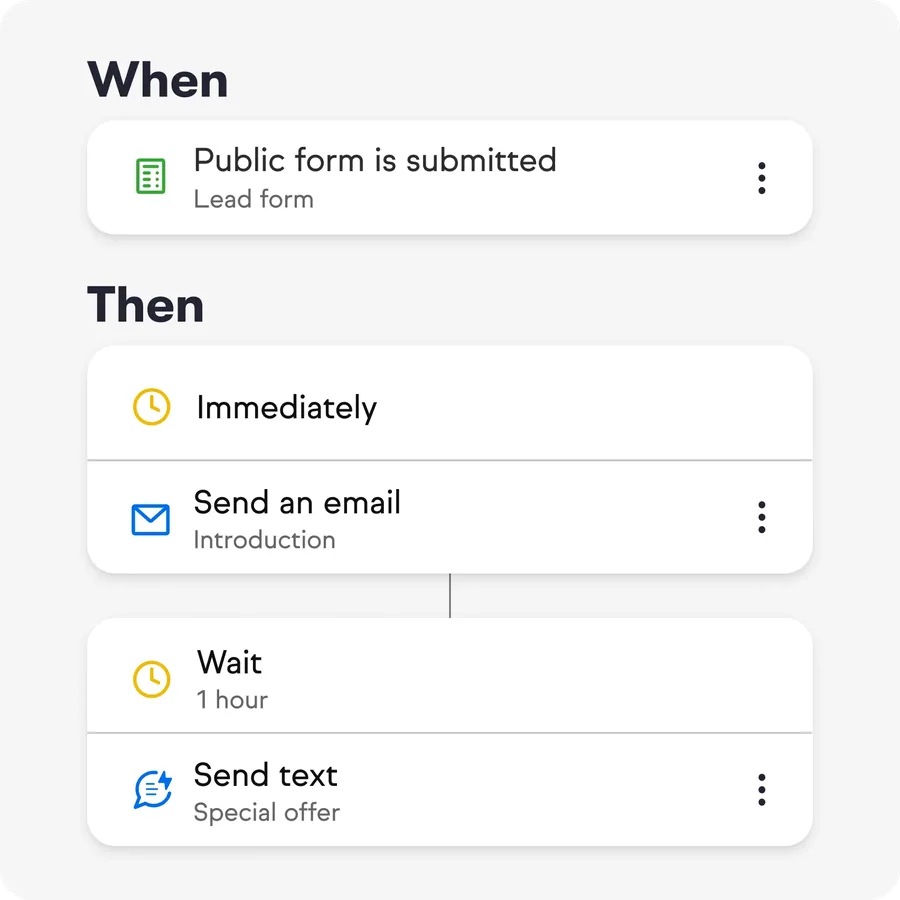
Keap's automation is the main reason to buy it. Simple "when, then" automations start from a trigger, such as a form submission, a tag or a booked appointment, and run timed email, text and task steps. For longer journeys, Keap provides a library of proven templates for lead magnets, webinars, review requests, referral requests, birthday campaigns, new-hire onboarding and billing. An AI automation assistant drafts a campaign from a prompt, and an automation history on each contact shows which steps it has received.
Email, Text and Landing Pages
Broadcast and one-to-one email, newsletters and an AI content assistant cover email marketing, and Gmail and Outlook sync keeps one-to-one emails on the contact record. An email deliverability dashboard flags problems early. Landing pages, multi-page sales funnels and forms capture leads and trigger automation. Text marketing adds broadcasts, automated texts and reply handling in the US, with one-to-one texting and a dedicated business line in the US and Canada.
Appointments
Booking links show your available times from a synced Gmail or Outlook calendar, and each appointment is logged on the contact and can trigger reminders. For businesses that run consultations or sessions, this replaces a separate scheduling app.
Quotes, Invoices and Payments
Quotes can be accepted with one click and turned into an invoice. Invoices can be one-time or recurring and sync with your payment and accounting tools. Checkout forms, order bumps and promo codes support online sales. Keap Pay is the native processor in the US, and PayPal, Stripe and Eway are supported. Billing automation chases past-due invoices, and card-expiry reminders protect recurring revenue. This is what most clearly separates Keap from email-first tools.
Reporting and Admin
A reporting hub lets you pin the reports you use most and compare results over time. Admin tools include default and custom user roles and permissions, duplicate merging, internal forms, task assignment and Google review requests. A customizable dashboard and the "My Day" view show each user's appointments and tasks.
Mobile App
The mobile app gives access to contacts, appointments, tasks and communications, and can send booking links and invoices on the go. Keap lists it as available in the US, Australia, Canada, the UK and New Zealand.
Ease of Use and Setup
Keap scores 3.4 here, the softest number in its profile. It is a capable system, but few owners configure it well alone, which is why Keap makes implementation compulsory. Its stated reason is that the businesses that succeed are the ones that get strategy, support and setup help. The implementation package includes a business-mapping session with an automation expert, done-for-you automations, data import and migration, third-party integrations and regular strategy calls. The free trial also limits how far you can test alone: it caps email at 25 sends, requires DKIM authentication before sending, and excludes payments and texting.
Integrations and API
Keap has a built-in Zapier integration for connecting thousands of other apps, an open API with webhooks for custom work, and native connections for Gmail and Outlook email and calendars. Payments connect through Keap Pay, PayPal, Stripe and Eway, and invoices sync with accounting tools. Because so much is built in, most Keap customers need fewer integrations than they would with a pure CRM.
Support and Customer Service
Support is a real strength. Every subscription includes US-based phone support during business hours Monday to Friday, 24/7 chat inside the app, and a dedicated Customer Success Manager for strategy questions. Keap Academy and Thryv Academy add on-demand courses, live training and webinars, and the Keap Community connects users on its own platform. That is more human help than most CRMs at any price, and it matters given the product's complexity. We score it 4.2.
Pros and Cons
What We Like
- CRM, automation, booking, quotes, invoices and payments in one subscription
- Deep "when, then" automation plus a library of proven templates
- Recurring billing, past-due reminders and card-expiry alerts built in
- US phone support, 24/7 chat and a dedicated success manager on every plan
- Required implementation means most customers start properly set up
- Toll-free number and 500 texts a month included in the US
What Could Be Better
- $320 a month to start, several times the price of a general CRM
- Implementation is required and not priced on the page
- $39 per extra user, and contacts move up in priced tiers
- $299 early termination fee on annual contracts; cancellation by phone
- Steeper learning curve than newer, simpler CRMs
- Text marketing is US only; trial excludes payments and texting
How Keap Compares with Other Options
| Tool | Starting price | Free plan / trial | Choose it over Keap when… |
|---|---|---|---|
| ActiveCampaign | $15/mo annual (1,000 contacts) | 14-day trial | Email automation is the main job and budget matters |
| HubSpot CRM | Free; low-cost Starter | Free plan (2 users) | You want a free start and self-serve setup with no required onboarding |
| GoHighLevel | $97/mo flat, unlimited users | 14-day trial | You want a similar all-in-one bundle for less, or run an agency |
| Capsule CRM | Free; $18/user annual | Free plan (2 users) | You want a simple CRM without payments or a setup fee |
Keap vs ActiveCampaign is the comparison most service businesses end up making. ActiveCampaign is the cheaper and broader email-automation tool, priced by contact count from $15 a month. Keap's edge is the sales and payments layer, booking and texting built in, plus human onboarding. If you would otherwise pay for separate invoicing, scheduling and texting tools alongside ActiveCampaign, the gap narrows.
Keap vs GoHighLevel is the other common question. GoHighLevel bundles a similar set of tools, including CRM, funnels, two-way texting, booking and payments, for a flat $97 a month with unlimited users, but it is built for agencies and you set it up yourself. Keap costs more and is designed around one business, with required, guided implementation. Our GoHighLevel alternatives and ActiveCampaign alternatives guides rank Keap among other options. For the full field, see the best CRM software ranking.
Frequently Asked Questions
How much does Keap cost?
Keap starts at $320 a month billed monthly for 2 users and 1,500 contacts, as checked on keap.com in November 2026. Extra users are $39 a month each, and more contacts move you up priced tiers, for example $356 for 2,500 contacts. Required implementation is quoted separately, so get that figure before you sign.
Is there a free trial for Keap?
Yes. Keap offers a free trial with no credit card required. The trial has most features but caps email at 25 sends, requires DKIM authentication before sending, and does not allow payments or texting. The pricing page does not state the trial length, so check it when you sign up.
Does Keap require onboarding?
Yes. Keap lists implementation services as required. Packages include strategy consulting, a business-mapping session, data import and migration, done-for-you automations and ongoing strategy calls. The price is not published on the pricing page; Keap quotes it, and says to ask about ways to save on implementation.
Who should not use Keap?
Sales-only teams that mainly need a pipeline and calling, businesses on a tight budget, and owners who want to set software up themselves. A sales team gets more for less from a CRM such as HubSpot or Pipedrive, and email-only needs are cheaper in ActiveCampaign.
Keap vs ActiveCampaign: which is better?
ActiveCampaign is cheaper and stronger as a pure email automation tool, from $15 a month billed annually for 1,000 contacts. Keap costs from $320 a month but adds a sales pipeline, booking, quotes, invoices, payments, US texting and guided setup. Choose by whether you need that sales and payments layer.
Is Keap the same as Infusionsoft?
Yes. Keap is the current name of the product that began as Infusionsoft, one of the earliest small-business marketing automation tools. Keap is now owned by Thryv, and its pricing page and support materials reference Thryv Academy training.
Our Final Take
Keap earns its 3.8 by delivering what it promises: a small service business can run follow-up, booking, invoicing and payments through one system, with real people to help set it up and keep it running. That costs real money: $320 a month to start, $39 per extra user, contact tiers on top, and a required implementation package. If you will use most of the bundle and value hands-on support, Keap is a mature, capable choice. If you mainly need a pipeline or a newsletter, a free CRM plus a focused email tool will cost a fraction as much.